Using Google Drive as a file server

Have you ever been in a situation where you need to host several files on the Web? Did you need for those files to have a dedicated URL? Personally, I have had few situations where this was the case, but today I encountered a learning activity that required students to quickly upload images they just captured so they could add them to a Google Map. After some searching around, I found that the Google Drive hosting API is perfect for this sort of thing. Here is what I did ...

Create Drive Folders

The first thing I had to do was create a set of Google Drive folders for students to put the images they just captured. For this activity, students were running around our university taking pictures of some of the landmarks. They were then going to use these images to create an interactive map of the campus with the My Places tool in Google Maps. I created several folders in a Google account I use only for this class. My TA's and I connected a class set of iPads to this account so the students could load their images directly into Drive, which is what they did as soon as they got back to the classroom.

An important step in this process is to set the permissions for the folders to Public. You can do this directly through Drive. You will find the folder, right-click and choose Get Link.


Screen Shot 2014-11-11 at 10.56.52 PM


You will then need to change the permissions. Google has a great explanation for how to do that right here.

Set Up the Hosted Site

This part is actually much easier than you might think. The first thing you need to do is grab this little URL:

http://googledrive.com/host/<folderID>/

Not sure where to find the folderID? I discuss it in this post. The URL will end up looking something like this:

http://googledrive.com/host/0B5YVN51uO5e_WGtSc2tBDB2bUk/ (don't worry, it doesn't work)

Google will add some characters to this URL as soon as you hit enter, but don't worry. It will work just fine. Here is an example of the files my students uploaded today. Screen Shot 2014-11-11 at 11.04.13 PM Once students have found the image they need for their project, they will need to copy the URL so they can paste it (above).

Note: The only files that will show up in the hosted folder are image, video, document (Word, PDF, etc.), and HTML (and other web-authoring files). Google Docs, Slides, Sheets and Drawing files will NOT show up in the hosted folder.

In my case, the students were pasting these URLs into a Google Map placemark so their images would show up when the placemark was clicked. Several of them held the iPad the wrong way, so their images are sideways. (Sigh.) Here is the map we created in class.

So, that's it. Students can take images, quickly upload them to a Google Drive folder, and they are instantly hosted on the Web with a dedicated URL. No logging in, no FTP, clunky photo albums. Just my files and their URLs. I don't think I will need this functionality all that often, but it sure will be handy when I do.

Update on embedding Google Drive folders

As I have written about before, embedding Google Drive folders is a great way to manage content on your LMS. Rather than logging in, uploading, and waiting, you simply copy files into a folder on your computer, and they magically show up in your LMS for students to view.The only drawback was that last year Google blocked iFrame embedding on all Google Drive folders and Google Sites pages.


Thankfully, Wes Fryer posted about this same thing and I was able to get back on track using the following code.

List view <iframe src="https://drive.google.com/embeddedfolderview?id=FOLDER-ID#list" width="800" height="600" frameborder="0"></iframe> Grid view <iframe src="https://drive.google.com/embeddedfolderview?id=FOLDER-ID#grid" width="800" height="600" frameborder="0"></iframe>

Finding the Folder ID can be a pain, especially if you are trying to embed a folder within a folder within a folder. I tend to create folders for everything, so I have to make sure I use the correct Folder ID. For example, here is the URL for one of my folders that is nested 4 folders deep. I have color-coded each level of the URL (which has been slightly altered to keep the folder private).

https://drive.google.com/drive/u/0/#folders/0B5YVN51uO5e_ZHZlc3Zxd09pU3M/0B5YVN51uO5e_VlhYN1Q3MVoydjA/0B5YVN51uO5e_ei1aYmdFcW9EUWc/0B5YVN51uO5e_TFJkYzFhZ0ltbWs

The last sting of characters is for the folder I actually want to embed. I just need to copy that code and paste into the URL above where it says FOLDER-ID, like I did below:

<iframe src="https://drive.google.com/embeddedfolderview?id=0B5YVN51uO5e_TFJkYzFhZ0ltbWs#grid" width="800" height="600" frameborder="0"></iframe>

You can always change the width and height to make the folder fit the space on your page. The process is pretty simple, and once you have done it a few times, it's actually quite easy. Good luck!

Give students timely feedback with a leaderboard

Turning something into a game does not necessarily mean people will suddenly like it. Atari learned this the hard way with their E.T. video game. It turns out that betting the farm on a mediocre video game based on a blockbuster movie is bad business.

The same is true with gamification, a term being thrown around a lot these days in education circles. The general idea behind gamification is that game mechanics can be used in non-game environments in order to get some of the same outcomes typically associated with games, such as engagement, problem-solving, cooperation, and motivation. Many teachers are applying the principles of game mechanics to course design in order to motivate their students in ways traditional instruction does not.

If a teacher wants to be successful at implementing gamification mechanics in the classroom, there are a few principles that must be addressed. Foremost, the game must be well designed with clear goals, rules, and roles. Kind of like teaching. In my own experience, another aspect of a successful game (and teaching) is timely feedback. In order to make good decisions that help the player keep moving forward, they need to know where they stand. There are many popular activities that rely on the concept of leaderboards, which have the dual role of informing players where they stand and creating drama for both players and observers. Figure skating, gymnastics, X Games, freestyle skiing, golf, and diving are just a few of the sports that use leaderboards.

Leaderboards can be applied to educational settings as well, but there are very few tools available that teachers can use to create and use them efficiently. One such tool is Leaderboarded, but it is not free and seems be designed more for business than education. After looking around and not seeing many options for my own leaderboard, I decided to do what I do best: build one using Google tools. Below are the steps to help you get started on your own leaderboard. You can also view an example of my leaderboard spreadsheet, and feel free to copy it into your Google Drive if you want to see my formulas for each column and worksheet.

Step 1: Create your point structure

Before you can have a leaderboard, you have to decide where the points are going to come from. You have lots of options for students to earn experience points, quest points, or any other kind of value that can be added to the total. I kept it simple and based my point total on attendance and modules completed. Every time a student is on time to class, they get 100 points. They get 50 if they are late, and zero points for missing class. Even if the student is sick. I'm playing for keeps here, folks.

Step 2: Set up your spreadsheet

I have found that I am more likely to keep my leaderboard updated if I have very few values to keep up with. The more complicated the "game" becomes, the more there is to enter. Personally, once I start feeling overwhelmed I am likely to get behind on entering values. The more behind I get, the more irrelevant the leaderboard becomes. So, keep it simple.

As you can see from my example, I created a separate sheet for each set of points. One for attendance and one for modules. I used the SUM and COUNTIF functions to tally the values for each sheet. I chose to use the digit 1 instead of 100 or 50 because it is easier to enter. I can have the spreadsheet multiply by 100 on the Participation worksheet so I don't have to.

You will use the Participation sheet to add up all of your totals from attendance and modules. This worksheet is important to include because you will use a pivot table to create the actual leaderboard, and you must have all of your points on one sheet to do that.

Step 3: Create a pivot table

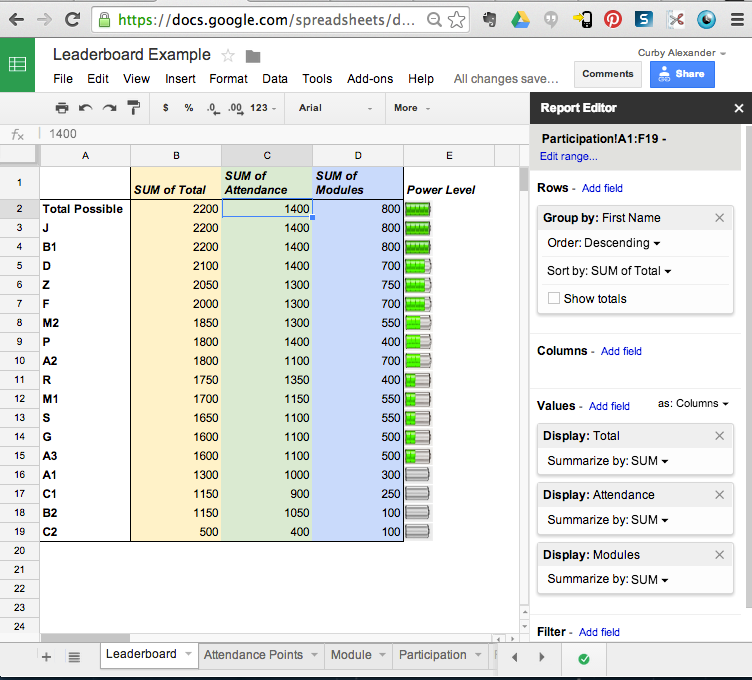
What is a pivot table, you might ask? Well, it is a data analysis tool built into most spreadsheets that lets you sort, add, average, or do other functions with the data in your spreadsheet. For this example, we are going to use the pivot table to display each student's total points and rank them from highest to lowest. Here is a screenshot of what this pivot table will look like when it is all set up.

Screen Shot 2014-06-20 at 10.05.54 PM

Leaderboard_Example_-_Google_Sheets_and_Pictures

Make sure every student in your leaderboard has a unique name, otherwise the pivot table will combine the totals for both students with the same name. I used numbers to keep the first initial separate. You will notice I have a battery icon for each student. I did this by creating a Rank worksheet and using the VLOOKUP function to apply the correct icon based on the student's total points. I did this more as an experiment. If you embed this spreadsheet using HTML, the images will not show up, so don't get your hopes up.

Step 4: Share the sheet with students

At this point, you have several options for how to share your leaderboard.

Option 1: The Whole Spreadsheet

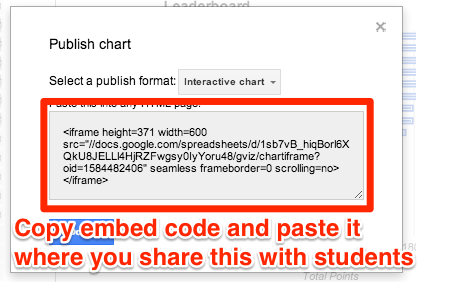
The simplest option is to share the link with the class or embed using the iFrame code Google gives you. If you share the entire sheet with the class, which I DO NOT recommend, you will want to protect your functions and make sure it is only viewable to those with the URL. If you choose to embed the entire spreadsheet, go to File --> Publish to Web. This will share your entire spreadsheet, so you need to make sure there isn't any sensitive information that you don't want the whole class to see. If you use icons for levels like I have done, they will not show up when you embed.

Option 2: One Worksheet from the Spreadsheet

If you only want to embed the leaderboard, you can use a special URL to show only the page you want. It looks like this, and I will show you how to plug in the appropriate values.

<iframe src="https://docs.google.com/spreadsheets/d/[Spreadsheet ID]/htmlembed?gid=[worksheet ID]&amp;single=true" height="1000" width="100%"></iframe>

Here is where you find those values in RED:

Google_Drive_--_Page_Not_Found


This will embed only the sheet you want to share, but it will not show any images you have in the cells.

Option 3: Interactive graph from Spreadsheet

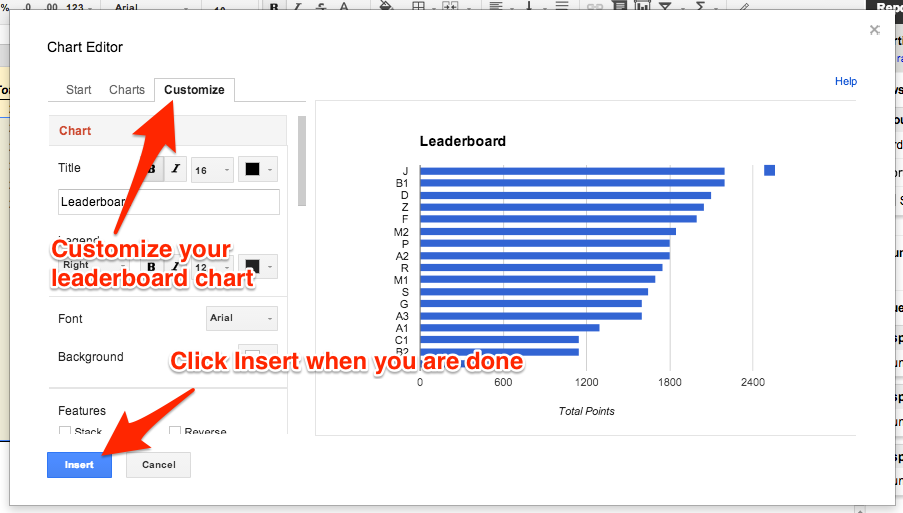
A final option for sharing the leaderboard is to create an interactive chart from the leaderboard and embed that wherever students will be looking for updated results. Here is how you do this:

Leaderboard_Example_-_Google_Sheets 2


Leaderboard_Example_-_Google_Sheets 3


Leaderboard_Example_-_Google_Sheets 4


Screen_Shot_2014-06-22_at_11_07_11_PM


Leaderboard_Example_-_Google_Sheets 5


And that is how you do it. This will take some tinkering, especially if you are not familiar with spreadsheet functions or pivot tables. I spent quite a bit of time messing around with this until I got it to work just how I wanted. I need to give credit where it's due for giving me this idea. I got the original idea from the EIPS Technology Blog, and I modified my leaderboard based on this design.


The Teaching Professor Conference 2014

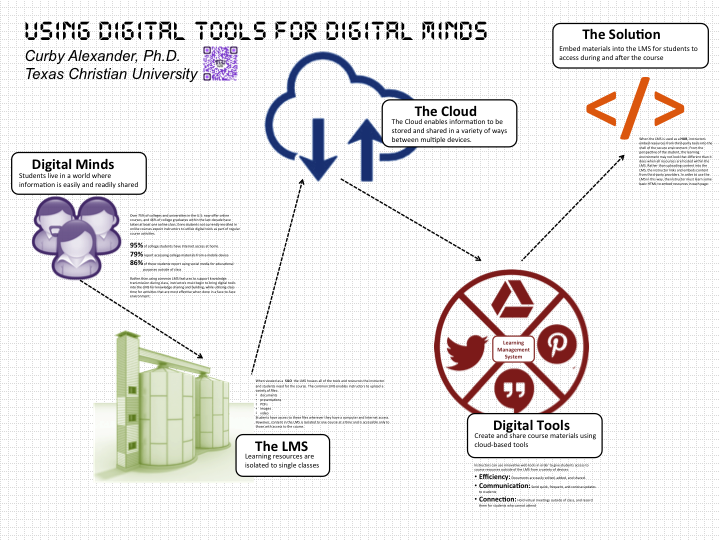
Alexander, Curby TPC poster  

Believe it or not, many of my musings on this blog end up in academic papers and conference presentations. For example, this blog post turned into this conference paper, which I am currently reworking into a journal manuscript. I took some of same ideas, and organized them into a poster that I will be presenting tomorrow at The Teaching Professor Conference in Boston. This is the first time I have attended this conference, and I am quite excited to see how it goes. My "home" conference is SITE (Society of Information Technology in Teacher Education), and I have gotten quite comfortable with it. I am on several committees, and I know so many people there that I end up spending most of my time talking in the hallway.

The program for this conference looks very interesting and covers a lot of topics I am currently interested in. I may or may not give updates from the conference itself, but you can rest assured that many of the things I hear and discuss will morph into posts on this blog.

Here is a link to the brochure I will be handing out at my poster session, which is displayed above.

5 Ways to Find Out What Students are Thinking

Bored Students

Student participation typically falls into two extreme ends of the class discussion continuum. Some students raise their hand every time I ask a question. These students have an opinion on just about everything, and if I'm not careful they will dominate class discussion. I have had experiences where the same 2-3 students will talk so much during discussions that the other students will stop raising their hands. As a teacher, this is definitely a scenario you want to avoid. The end of the spectrum is characterized by a room full of students who are so disengaged they will barely make eye contact. Maybe they didn't do the class reading, or perhaps they think that avoiding discussion will shorten class time and end in an early dismissal. Perhaps the class is large and students are intimidated speaking in front of the group. Either way, it makes for a very awkward and aggravating situation.

The longer I have taught, the more strategies I have discovered for getting the entire class involved in discussion. Early in my career I would just pose questions to the entire class. I eventually learned simple strategies like using cards or popsicle sticks for calling on students who don't raise their hands. This helped me get more students involved. Still, getting called on was a game of chance and some students would tune out in hopes that their number wouldn't get called. I eventually started using some different pedagogical strategies such as Think, Pair, Share, Numbered Heads Together, Jigsaw, Jeopardy, or Fishbowl for engaging students in discussion prompts. Each of these techniques for facilitating discussion got everyone involved and had more accountability than sitting in class hoping not to get called on.

Even with great discussion strategies, there are times when I want to know what the students are thinking. This isn't always possible when the majority of the discussion is a verbal exchange. I have used chart paper or construction paper to have students summarize their thoughts, but this is not always easy to present and when it's all over I'm stuck with a bunch of chart paper.

With the emergence of free (or kind of cheap) web-based and mobile apps, teachers can find out what students are thinking in a variety of ways, and all without using up all the consumables. I will describe five tools I have used in my classes to put student thinking at the forefront of the discussion.

Socrative

This is a free app that has iOS, Android, and web-based options. Students enter in the class code then wait for a prompt from the teacher. Results are instantly aggregated on the screen, giving everyone real-time results from the prompt. There are several options for prompts teachers can send the class, including T/F, Multiple Choice, and Short Answer. Prompts can be generic (i.e., A, B, C ...) or prepared in advance with specific answer choices. Results from saved quizzes can be downloaded as a spreadsheet for further analysis or grading.

Socrative is a great tool for quick discussion questions where you A) want students to talk about a prompt and B) get fast statistics on what everyone is thinking. I have had students use the mobile app on their phones many times, and it almost always works like a champ. I just post the question, students grab their phones, and within minutes you have a bar graph populated with student responses. This can actually prompt further discussion.

ActivePrompt

Another way to find out what students are thinking is to have them place a dot on an image. When enough people do this on the same image you can start to see trends and hotspots. I have done this with continua (e.g., Place a dot on the continuum where you believe the responsibility lies for a positive classroom: Teachers or Students), maps, quadrants, or other diagrams.

When you upload an image to ActivePrompt, you are given two prompts: one for the students to place their dot, and one with all of the dots displayed. You can try this using the following URL:

http://activeprompt.herokuapp.com/SBGWN

You can see the results here:

http://activeprompt.herokuapp.com/TWBUN

I have used this tool in class several times, and it has always been reliable. Students will typically discuss a prompt in pairs, place their dot based on their discussion, then we will discuss patterns and themes as a class.

InfuseLearning

This tool has many of the same features as Socrative, but it has the extra benefit of the InfuseDraw tool. Teachers send students a prompt on which they can draw, annotate, or label an image. Results are saved in the teacher dashboard and can be downloaded as a PDF. Like Socrative, the students do not need an account to log in. They just enter the class code and they are ready for the teacher to send the prompt. The few times I have used this tool it has worked great. Since Apollo, my class-syncing tool of choice, has some of the same features I tend to use that tool instead. However, if you are looking for straight prompts without having students follow your presentation on their screens, InfuseLearning is the way to go.

Google Presentation

I have already written about how to use this tool before, so I won't spend a lot of time explaining how I have used this activity in class. You can do the same thing, or something similar, with Google Docs or Draw, but I like the features in Presentation and the fact that you can assign each group a different slide in the same file.

Google Forms

If you are wanting to get more extensive feedback from students, Forms is the way to go. Results from the forms are instantly sent to a spreadsheet. We all know that spreadsheets are like magic because of all you can do with them. With the emergence of Add-Ons, you can now do even more. Some examples of ways I have used Form data: display the automatically-generated pie graphs, randomly choose responses directly from the spreadsheet, cut and paste the responses into Wordle for an (almost) instant word cloud, or e-mail the students a badge once they complete a set of prompts or an activity (this is not done in real-time ... usually after class).

Since the types of items you can use in a Google form are so diverse, there are many opportunities to use this tool to facilitate discussion in class. Responses are anonymous by default unless  you include an item for names. This tool will require some preparation before class, but that is true of most that I have mentioned here. It's one thing to send out an impromptu poll using Socrative. It's something quite different to make my students sit and watch me create a Google Form. Overall, this is a great tool to keep in the box and use when it fits your instruction.

The importance of discussing and reflecting on learning experiences is pretty well documented. When we give students the opportunity to verbally process their thinking, we increase the chances that they will be able to retain and apply skills and knowledge after the fact. Discussion and reflection helps us give new information personal meaning. Good class discussion starts with good pedagogical practice, but with new tools there are even more opportunities to make it relevant, engaging, and active.

What tools or strategies do you use to facilitate class discussion and find out what students are thinking?

Ripple Effect

Screen Shot 2014-05-08 at 9.00.09 AM Last fall I taught a class on Digital Communication and Collaboration. We talked about, among other things, the power of creating a PLN (personal learning network). We read a book on this topic, shared a few articles, and had some interesting discussions. What we never really did was create or participate in a PLN in a meaningful or transformative way. This included me, who had always been a solitary and introspective kind of guy. I followed a few blogs and tweets, but I was not an active participant in any kind of PLN. This makes teaching the benefits of a PLN a really hard sell, to say the least. At the end of the semester, I was determined to change that.

I started this blog in 2009, and until this January had never had more than 20 views in one day. I would post sporadically and rarely shared anything I wrote. The blog, for all intents and purposes, was a sandbox for me to kick around ideas and journal some of my experiences as an instructor, faculty member, and techie. My total number of views (if those analytic statistics can be trusted) from 2009 to 2013 was roughly 1,800. My point is, I was not breaking any kind of internet records with my blogging skills. On a side note, let me just tell you that keeping a blog going is hard work. This is due to the fact that:

  • I'm one guy
  • It's not my job
  • TCU and my family keep me quite busy
  • I am not a fount of awesome ideas

Having shared this, you can see that the baseline was quite low and any movement of the needle would be easy to detect.

Coincidentally, around the beginning of the spring semester I shared some tech ideas with my college in a faculty meeting and decided to write them up in a series of blog posts. Based on my experience the previous semester in my class, I was already connected to several communities and groups on Google+ and Twitter. So, I thought why not share my posts in those communities and with a few folks via strategically placed tweets. What happened next really opened my eyes to the potential of connected learners and social media.

On the image above, you can see in green where I wrote something new on my blog. I blurred out the dates and stats because I guess I'm kind of self-conscious and it kind of feels like taking a screenshot of my bank account. Anyway, as soon as I was done with my blog post, I would send it out to a few different Google+ communities and on Twitter. The orange arrows represent the activity around that post from those communities. This consisted of sharing, retweeting, scooping, e-mailing, Facebooking, etc. my  content with others. Since I use Wordpress, I was able to see the source of my web traffic. The buzz would wane over a few days, then sure enough someone else would pick it up and share it again, causing my stats to spike again (though never as much as the first time).

An interesting observation from this is the 3rd green arrow. I posted this but decided not to share it with my usual peeps. It was more introspective and not really that interesting to most people. Someone who follows my blog, however, shared it on Google+ and Twitter a few days later, causing quite the spike in traffic for a couple of days.

This has been an interesting and serendipitous experience, to say the least. I am a self-described technology ninja, an emerging technology samurai, and not really a technology shogun (leader) at all. Jumping into the world of sharing, re-sharing, and joining the larger ed. tech. conversation has definitely let me see firsthand how powerful this can be in a person's personal and professional life.

And yes, I plan on sending this out for the masses to read, share, and re-share. If you want. No pressure.

Schoolification

Pac-Man (1980), will go on show at MoMA in New York in 2013 I have been thinking about gamification a lot lately. I teach a really big class full of energetic undergraduates, and I want to make the class better. It is already pretty darn good, but there is always room for improvement. One way to do this is to add game elements to some of the more mundane aspects of the course.

As an aspiring Teaching and Learning scholar, I dug into the literature on gamification and game-based learning (and trust me, there is A LOT of it!) to investigate possible frameworks and suggestions for a successful implementation of game-based learning. One framework that has been really helpful for me as I plan some game-based elements into my course was proposed by Bunchball, a corporate gamification company. As stated in one of their white papers, there are 6 elements that serve as the building blocks to all successful games. Coincidentally, these game elements interact with game dynamics that are associated with basic human desires that tend to motivate and engage people within a gaming experience.

[table id=1 /]

When I look at this table, I see many similarities and natural applications to education. The way the education system is currently structured, there is already a pretty heavy dose of competition, achievement, reward, and status. There is also some possibility for self-expression and altruism, depending on the way a course is set up. So, I understand that education and gamification go hand-in-hand quite naturally.

So what happens when an instructor takes activities that students might naturally enjoy and make them just another assignment? I call this "schoolification," which is when a teacher deflates student interest in an activity or project by assigning points, a grade, or any other requirement that students might otherwise resist.

The first time I encountered schoolification, before I even had a name for it, was in a conference presentation where a professor described his use of Facebook in his classes. Each student in the class had to join his group on FB, they were required to comment on his posts, and they would "lose points" if they didn't do either of those things. My first thought was, wow, that's a great way to make students hate Facebook. Take something they like, make them use it in a way they don't want, then hold their grade over their head of they don't do it.

If the instructor is not careful, I think the same thing can happen with blogs, digital stories, flipped lessons, and cooperative learning (or any other activity for that matter). Students have to be held accountable for their professionalism, but how do we do this without schoolifying activities they might otherwise enjoy? This is a challenge I would like to learn more about.

How do you hold students accountable for their participation in class activities without schoolifying those activities that are intended to be engaging and fun.

Gradenomics

It's that time of year again, when I spend a lot of time reflecting on the semester and academic year. I have already posted once about this, and I have at least two more ideas incubating in my mind. The idea that came to me today as I graded final exams, calculated final averages, and entered final grades into "the system" is that universities - or perhaps my university - put a lot of emphasis on finals. This led me to consider whether or not there TOO much emphasis on final exams. As it is now, we set aside an entire week, shuffle the schedule, and give each professor 2.5 hours to administer the exam. Yet, I have not given a comprehensive final since my 2nd year of teaching higher education. Is this really worthy of its own week?

My first college teaching assignment was as a Master's student, and I taught public speaking. It was a massive faculty-directed, TA-taught course where they basically told us what to do. We had some freedom to teach any way we wanted, but we had to give the same assignments and grade using the same rubric. If our overall GPA was too high, we got a personal note from the course director telling us to grade harder. We also had to give a comprehensive final, which seemed totally ridiculous for a public speaking class.

Since those days, I have jockeyed between giving a final project (portfolio, paper, etc.) and giving the last test during the final time slot. My current university is adamant about professors doing something during finals week, so I have been using that time to give the last exam. I have also used this time to have students present their final projects, but it just seems contrived to me and seems to always fall a little flat. Some of the more adventurous faculty have the students bring food and they have a party.

My point is, there is a certain amount of hype associated with finals that I am starting to think is unnecessary. Whereas my students typically cram for the first two exams, they spend days and days studying for the last exam. And what is the payoff? Actually, the course average was lower than the second exam even though the exams were about at the same level of difficulty. I have exams weighted so that each test accounts for about 13% of the final grade. I did this a few semesters ago because I wanted the exams to mean something. Before I weighted the exam scores, a student could do poorly on exams and still eek out a decent grade by getting some of the "sit-and-get" grades, such as attendance or participation. Basically, taking the exam counted the same toward the course average as showing up to lecture and surfing Pinterest for an hour. So, what does this mean in terms of the last exam's impact on the overall grade? Here are some points to consider (remember, this is based on a scale where each exam contributes 13%, or 39% total, toward the overall grade):

  • 35 out of 53 students got a score on the final within 2 percentage points of their current average. Mathematically, this had absolutely no impact on the final grade. For example, if a student was sitting at 91.21% and got a 93% on the final, the overall average was raised to 91.55% (I'm making these numbers up, of course, but they are pretty accurate to what I observed). Unless a student was a fraction of a percentage point from the next grade, this had no impact. It was just damage control.
  • If a student scored 10 percentage points higher or lower on the final than the overall average, it meant a difference of 1 percentage point either way. In fact, this held true for every 10 percentage point differential. For example, getting a 75% on the test would lower the average from 85 to 84. That also means that getting a 100% on the test would only raise the average from a 85 to 87 (and that is a generous estimate). This is the difference between a B and B+, which is hardly the Hail Mary the students think it is.
  •  9 out of 53 students went down one grade based on their final exam score, and each of them was 1 point or less from the borderline. That is, they went from a B+ to a B, but they started at  87.1% not 89.9%.
  • Only one student went UP a grade based on the final exam score, and the starting average was already less than a percentage point from the cutoff.

Are you confused yet?

I am not advocating students completely blowing off a final because it won't make a difference in the long run. Students should always give their best effort no matter what. I also know that students spend just about as much time eating junk food and complaining about their professors during "dead days" as they do studying. I am just wondering if we should put so much emphasis on that one week when it's really the students' body of work throughout the semester that compiles their course average.

I am curious to know how others handle finals, and if they have more (or less) of an impact in your courses than what I have described? How are finals handled in other disciplines? Should they be more high-stakes, or are they just hype?

Dealing with Disappointment

I have been teaching for nearly 20 years, and I have seen just about everything. Throughout the many life changes I have experienced in that time, teaching, oddly enough, has been one of the constants in my life. Early in my career I would stay late at school and come home to an empty apartment. Soon enough, I was finding ways to have lunch with my wife over our short lunch breaks. Then I was rushing home after teaching so I could spend time with my babies. Now I have to be creative in order to balance my teaching with things like baseball, gymnastics, theater classes, church, committees, writing, and staying connected to family. During all this time, students have come and gone from my classes, hopefully taking something with them that will help in their life journey.

Teaching requires a lot of creativity and problem solving because no matter what is happening in your life, you have to try to do your best for the students. In my career I have had to deal with crazy parents, over-scheduled meetings which force me to plan my lessons late into the night, hectic travel schedules for the sports I coached, sleepless nights, unexpected family crises, unpredictable weather, and disruptions to the school day. All in all, I would say I have done a pretty good job of paddling and finding the current. There is, however, one aspect of teaching with which I have not dealt very well.

Disappointment.

Maybe it's because I expect myself to be perfect. Or amazing. Or brilliant. Perhaps I spend too much time comparing myself to my peers and wanting to be the big fish in the pond. I already know I put too much stock in my course evaluations and Rate My Professor and any other metric I can find to evaluate my worth as a teacher, so maybe that feeds my disappointment. It could be that my expectations are too high, and while I perceive the response to a good class to be a standing ovation, my students are just anxious to meet their friends for lunch. No matter what the cause - and it's probably a complex mix of those factors I already listed, along with some I haven't identified - disappointment has always been a tough pill to swallow.

For the better part of this semester, I have been dealing with disappointment: in myself, in my students, in the fact that I didn't foresee some of the problems with one of the classes I have been teaching. Since the third week of the semester, things took a downward turn and despite my attempts to make the class better it has not been enough to make it a positive experience for anyone involved. Like I said, very disappointing.

It would be easy to wrap myself in self-pity, curl up in bed, close my eyes, and just wait for the semester to end. Trust me, I have considered that many times, and perhaps in small ways I have done some of that. However, as the self-reflective navel-gazer that I am, the ultimate question is this: What do I plan on doing about it? Other than venting to a few colleagues, which I have done more than I care to admit, I can't help but abstract some lessons from my disappointing semester.

Disappointment reminds me that I care.

If teaching and teaching future teachers about teaching was not a big deal to me, this would be easy to shrug off. Blame the students and move on. But this does matter to me and I understand the importance of what I am doing. No one is guaranteed that living out their passions or purpose or calling will be without setbacks. The setbacks actually remind us how closely our calling, purpose, and passion are woven in with our very being.

Disappointment reveals areas to get better.

Do you know which of my classes have historically gone the worst for me? Those which follow a class which has gone really well. If I think I have reached superstar status, where is the incentive to do things better, to be self-reflective, or try new ideas? There is no such thing as cruise control in teaching, and just because a certain approach or teaching style worked with one class does not mean it will work the next time. As long as I am teaching, there will be aspects of my practice that need to be revised, refined, or removed. It's hard to see those things when I am blinded by my own awesomeness.

Disappointment reinforces what is constant.

Even though I have to adapt every class based on the unique dynamics created by the students and circumstances, there are some elements of instructional practice that should never be compromised. High (yet reasonable) expectations. Timely feedback. Positive teacher to student relationships. Close monitoring of student engagement. Consistency. Fairness. Preparation. These make up the foundation of a healthy, vibrant class. I may be stuck with a class full of disengaged, apathetic, know-it-all students (speaking in general terms, of course ... not any particular class), but that should not change those core elements of effective teaching. If anything, the tougher the students, the more I should lean into those aspects of teaching that have been proven over time. Don't play off your students' responses because chances are they stayed up too late, woke up minutes before class, and put off their assignment until the last minute. As a baseline, my teaching must be one of the constants in their lives.

Honestly, I am thankful things did not go as well as I had hoped this semester (in one class at least ... the others went great). I have a lot to learn, a lot to improve, and a long way to go. Adversity causes everyone to either wilt or get stronger, and I choose the latter. The day I think otherwise about my teaching is probably a sign it's time to choose a new career. Thank you, disappointment, for the not-so-gentle reminder.

Are You a Technology Ninja or Samurai?


ninja-samurai

I will start by stating the obvious: There is a HUGE difference between learning to use technology for yourself and using it effectively in the student learning process. Both applications of technology have specific skill sets, they inform each other, and they are both important. In the educational technology world, you might see this dichotomy through various lenses: digital media literacy, TPACK, SAMR, or some other framework you're fond of presenting at conferences.

My awareness of the massive difference between these technology applications came when I began encouraging the students in my large, 100-person education course to bring their laptops, tablets, and phones. OK, I don't have to actually encourage college students to bring their phones to class. Pry them out of their hands? That's more like it. Anyway, once I began infusing my class with activities that require technology, I realized I am not as good as teaching with it as I thought I was. Yes, I knew how to do some cool things to present information to my class, but when it came to using technology in real time with 100 students in a way that kept them active and engaged, I had a lot to learn. This is when I decided I was a pretty good Technology Ninja, but I had a long way to go until I was a Technology Samurai.

What do these two terms mean? Let me explain.

Technology Ninja

Ninja were covert agents who specialized in espionage, assassination, sabotage, and infiltration. They were skilled at disguising themselves as servants, camouflaging themselves with trees and other objects, and scaling the walls of buildings like Spider-Man. Their objective was to infiltrate enemy dwellings without being seen. In fact, there is probably a ninja in your pantry right now, scooping out your peanut butter with a Chinese Throwing Star.

As a Technology Ninja, I have gotten really good at using technology in ways that my students hardly know it's there. My most recent set of posts about Outsmarting the LMS is a good illustration of ways to be a Technology Ninja. You can embed documents and web pages, install scripts, and set up forms to make your job easier, and the people actually using these tools have no idea about the magic you have worked on the back end. They just know it works.

While these ninjutsu techniques save me a lot of time and energy in the long run, they do very little to influence the lived experience of my class meetings. Most of the work is done in the background, usually in the form of tinkering, testing, and modifying. It wasn't until I told my entire class of 100+ students that I wanted them to bring their devices to class that I realized these skills were not sufficient for me to reach the level of technology greatness I have always aspired to achieve.

Technology Samurai

When I first began thinking through these ideas, I wrote this out as SAMRi. Get it? SAMR with a lower-case i, like Apple does, only at the end of the word instead of the beginning. Because I am aiming for the R (redefinition) in SAMRand after I achieve the R in my technology integration skills/knowledge, then I will be a technology SAMRi! Uh ... yeah. Anything that needs that much explanation is not as clever as I initially thought it was. Also, SAMRi would direct a lot of traffic to my blog by people looking for Saudi Arabian folk music.

So, what is a Technology Samurai? The traditional samurai were an elite class of noble Japanese warriors, dedicated to protecting their culture, leaders, and territory. Unlike those stealth and sneaky ninjas, they were skilled at hand-to-hand combat and infantry tactics. Their weapons of choice were swords, kama, longbows, daggers, and armor. They were skilled horsemen, and they were also known to use rifles and cannons in the latter years of their existence. Samurai were also governed by a strict honor code, characterized by discipline and loyalty. In a word, they were fearless.

You know what else is fearless? Telling your class to BYOD. Unless you have thought through the details of your activity, you will have students knee deep in Pinterest or Facebook before you can say, "OK, let me just try one more thing to get this to work." Students love technology, but not in the way nerds like me think they love it. They love that technology connects them to the things they love.

So, after having done this for a semester, I have started coming up with a few essential skills that every Technology Samurai must master. These skills/tools are focused primarily on teaching in a BYOD or 1:1 environment. I will address being a Technology Samurai in the areas of digital media projects, collaboration, research, etc. in the coming weeks.

Sync your class

You must have a way to get every student in the same place and keep them there. Your class LMS page won't work. Neither will a Facebook group or Schoology or Edmodo. Why? There are too many other features to look at. Grades, assignments, forums, friends. Too many distractors. You need to keep them all in the same place at once. I recommend a tool like Apollo or Top Hat. If all of your students are on iPads, you may consider NearPod. Each of these tools has something in common: they put your content on every screen in the room at the same time. Yes, students can stray away, but not as much as you might think.

Reduce Friction

This is something that took me awhile to figure out. Personally, I do not like logging in to things. I would much rather log in once and then have the tool remember me. Google, Facebook, Pinterest, Twitter .... they are great at this. My school's LMS? It's like Guy Pearce in Memento every time I close the browser window. Whenever possible, I try to minimize the number of times students have to log in to do class activities. Once is ideal, twice is acceptable, three times is just getting to be plain annoying.

Collect student responses

In addition to getting all of the students in one place, virtually speaking, you want to keep them engaged. A good way to do this is to involve them in activities that make them think then require a response. There are several tools that will let you do this. Apollo and Top Hat have built-in student response features. Socrative and Infuselearning provide another way for students to respond, and they do not have to set up an account to do it. They just enter the class code, and they automatically receive a prompt every time the teacher posts a question.

Deploy links

Another important tool to have in your arsenal if you are going to teach like a samurai is to be able to deploy links to the class. By deploy links, I mean send the student out from your synced content to other content (videos, web pages, forms, etc.). Apps like Apollo and Infuselearning have a built-in link tool that will send a URL to every student logged into your class page or presentation. This is really handy if you want students to spend a few minutes reading and discussing an article, blog post, video, or image. You can also send the students to an editable Google Doc, Sheet, or Presentation if you want to give them a place to discuss or share ideas.

An acceptable alternative to sending links to students is using a URL shortening tool, like bit.ly or goo.gl. Just remember to use a serif font so the students can tell the different between capital I and lower-case L. You may also want to consider if this is appropriate based on the size of the room and projection system, the age of the students, and number of times you are having them key in shortened URLs. If you have a bunch of these on the board, it may get confusing to the students.

Facilitate group work

Another skill to master as a Technology Samurai is to keep students engaged in group activities with their computers. I mean, the students have lugged their computers to class and followed along up to this point, so why not do some things with computers that computers are uniquely good at doing. Maybe that involves editing the same document at the same time, or adding slides to a common presentation. You can have them pin and explain places on a map.  Annotate or draw images using the drawing quiz tool in Apollo or Infuselearning. Create a 5-picture story, or capture a 30-second explanation on Educreations. I'm not trying to exhaust the possibilities here. If you went to the trouble to have the students bring their computers to class (or went to the extreme trouble of providing a device for every student in the school), then leverage the capabilities of a computer. Don't use it like a pencil then complain that students just want to look at Pinterest.

Showcase the students

Now that you have had the students doing some activities on the computer during class, showcase their work. Display their annotations and diagrams. Flip through the presentation and let each group present their page. Show the 5-pic stories and see if the students can guess the topic. Watch the 30-second explanations. This part of the BYOD learning environment is more than the payoff. It's the point in the lesson in which you communicate to your students whether you, as the chief learner in the room, value this activity as a real learning endeavor or just a hi-tech time filler. If you truly value the work they are doing, then devote time to acknowledging, praising, critiquing, and sharing the fruits of their labor. If you blow past the showcase, don't be surprised if the students show less enthusiasm and engagement the next time around.

You should strive to be both a ninja and a samurai. A samja. A ninjurai. A SAMuRinja. Both skill sets are important for teachers these days, for different reasons. One will keep you learning, the other will help you focus on student learning. The way of the ninja and samurai is not easy. They involve risk, uncertainty, failures, faith, persistence, patience, creativity, and problem solving. There is great cost in becoming a lifelong learner, but it's not nearly as costly as settling in and ceasing to grow and develop as a teacher.

So, what are your examples of being a Technology Ninja or Samurai? I will follow up on this, and I would love to hear your ideas.